
AI automation for small businesses is often described in extremes. Some tools promise to run an entire company. Other conversations focus only on jobs being replaced. Most business owners need something far more practical: a reliable way to reduce repetitive work, improve follow-up, and help their teams find the information they need.
A small business usually does not need to automate everything. It needs to identify one workflow that repeatedly consumes time, creates delays, or causes important details to fall through the cracks.
That is where AI and automation can earn their place.
Instead of asking, “How can we add AI to the business?” start with a better question:
Which part of the business repeatedly creates unnecessary work, and what is the simplest reliable way to improve it?
Sometimes the answer is AI. Sometimes it is traditional automation, a software integration, a custom internal tool, or a better-designed process.
The goal is not to force AI into every situation. The goal is to build a useful system that produces a measurable result.
What Does AI Automation Actually Mean?
Traditional automation is excellent at following predictable rules. It can move information between systems, send a notification, create a record, update a status, or start a follow-up task when a specific event occurs.
AI becomes useful when a workflow includes information that is less structured. It can help interpret an email, extract details from a document, categorize a request, summarize a conversation, search company knowledge, or prepare a draft for a person to review.
In practice, the strongest systems often combine both. At its best, AI automation for small businesses uses AI for interpretation and dependable software rules for validation, routing, and control.
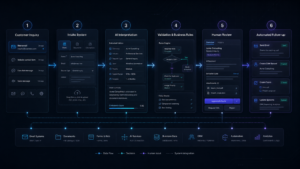
For example, a lead-intake workflow could:
- Receive an inquiry from a website form or email.
- Extract the customer’s contact information and request.
- Categorize the inquiry.
- Create a record in the company’s existing system.
- Draft an acknowledgment or next-step message.
- Notify the right person when review is needed.
The value does not come from being able to say that “AI answered an email.” The value comes from reducing manual handoffs, responding more consistently, and giving employees more time for work that requires judgment.
Start With Business Friction, Not Software
It is easy to begin with a tool. A business owner hears about an AI agent, chatbot, automation platform, or new customer-management product and immediately wonders whether the company needs it.
That approach often creates another subscription, another login, and another system for employees to manage.
A better approach begins with the current workflow. Look for work that is frequent, repetitive, measurable, and frustrating.
Ask questions such as:
- Where do employees copy the same information from one system into another?
- Which requests wait too long before reaching the right person?
- What information is difficult for employees to find?
- Which customer questions are answered repeatedly?
- Where do mistakes, incomplete records, or missed follow-ups occur?
- Which reports require someone to assemble information manually?
- What task does the team regularly describe as a waste of time?
These questions reveal the actual opportunity. Once the problem is clear, the technology can be selected around the business instead of forcing the business to fit a particular product.
Six Practical Uses of AI Automation for Small Businesses
The best opportunity will be different for every company. However, the following areas are often worth evaluating.
1. Lead Intake and Follow-Up
Inquiries may arrive through a website, email, social media, phone calls, and referrals. Someone then has to collect the information, understand what the customer needs, create a record, assign the inquiry, and remember to follow up.
A well-designed workflow can organize those steps without removing the human relationship.
It might capture the inquiry, extract the important details, place the lead in the correct category, draft an acknowledgment, and create a follow-up task. A person can still take control when the request is unusual, valuable, sensitive, or unclear.
2. Document Processing and Data Entry
Many businesses receive forms, invoices, work orders, applications, inspection records, or vendor documents that must be opened, reviewed, renamed, categorized, and entered into another system.
AI may be able to extract or classify the information. Traditional automation can then move it to the correct destination. Human review can remain in place for missing information, low-confidence results, and exceptions.
The goal should not be to remove every person from the process. The goal should be to stop requiring a person to perform the same predictable preparation on every document.
3. Internal Knowledge Search
A company may already possess the answers its employees need. The problem is that those answers are scattered across shared drives, PDFs, policies, project notes, manuals, email threads, and internal websites.
A grounded knowledge assistant can help employees search approved business information and see where an answer came from. That is very different from asking a public chatbot to guess.
A useful internal assistant should respect permissions, reference its sources, and make uncertainty visible. When an answer affects an important decision, a person should still verify it.
4. Routine Customer Communication
Customers often need updates that are important but predictable. Examples include confirmations, appointment reminders, requests for missing information, order-status updates, project notifications, and follow-up messages.
Automating the predictable part can improve consistency and response time. Employees can then spend more of their attention on conversations that require empathy, negotiation, troubleshooting, or judgment.
5. Reporting and Summaries
Reports are often assembled by copying information from several systems into a spreadsheet, presentation, or email.
A better workflow may collect approved data, organize it, highlight exceptions, and prepare a summary for review. The final decision still belongs to a person, but the preparation becomes faster and more consistent.
6. System-to-System Handoffs
A surprising amount of work exists only because two business systems do not communicate.
For example, someone may copy a new customer from a website into a CRM, move an approved quote into a project tool, enter order details into accounting software, or transfer support information into a ticketing system.
An integration can remove these handoffs. AI may help interpret the incoming information, while ordinary software rules validate and route it.
What Should Not Be Automated First?
A process can be repetitive and still be a poor starting point.
Be cautious when the workflow includes:
- An irreversible or high-consequence decision
- Sensitive information without appropriate safeguards
- A process that employees cannot consistently explain
- Many unusual exceptions
- Emotionally sensitive customer conversations
- Work that happens too rarely to justify a custom solution
- Decisions that require licensed, legal, medical, financial, or other professional judgment
A broken process does not become reliable because it has been automated. In fact, automation can cause a weak process to fail more quickly and at a larger scale.
Before building anything, define the normal path, the exceptions, the risks, and the point at which a person must take control.
Do You Need AI, Traditional Automation, or Custom Software?
These terms are often grouped together, but they solve different parts of a problem.
Traditional Automation
Traditional automation is usually the best choice when the rules and information are structured.
It works well for triggers, notifications, field updates, approvals, file movement, and predictable system-to-system actions.
AI Integration
AI integration becomes more useful when the system must interpret language, summarize information, search less-structured material, categorize requests, or prepare written content.
It should have clear boundaries. Important outputs may need source references, confidence checks, approval steps, or human review.
Custom Software
Custom software may be appropriate when the business has a valuable workflow that does not fit an existing platform.
That could mean an internal dashboard, customer portal, specialized quoting system, custom CRM, reporting tool, or application built around the company’s actual process.
Many strong projects combine all three: custom software for the user experience, integrations for moving data, and AI for the portions that require interpretation.
A Simple Way to Choose Your First Automation Project
The strongest AI automation for small businesses starts with a narrow, measurable workflow.
You can compare potential projects with a basic scoring exercise. This is not a formal return-on-investment model. It is simply a quick way to identify which workflow deserves a closer look.
| Factor | What to Evaluate |
|---|---|
| Frequency | How often does the task occur? |
| Time Cost | How much employee time does the full process consume? |
| Repeatability | How consistent are the steps and inputs? |
| Business Impact | Would improvement affect revenue, service, speed, or capacity? |
| Measurability | Can you measure the current and improved result? |
| Risk and Exceptions | How serious are mistakes, and how many unusual cases occur? |
A simple starting formula is:
First Project Score = Frequency + Time Cost + Repeatability + Business Impact + Measurability − Risk and Exceptions
A high score does not automatically mean “build it.” It means the workflow is worth investigating.
For example, routing website inquiries may score highly because it happens often, follows a recognizable pattern, and can be measured through response time and missed-lead rate.
An infrequent, high-risk business decision may score poorly because the consequences and exception rate are much higher.
Define Success Before Choosing the Technology
A project is easier to evaluate when success is defined before development begins.
Useful measurements may include:
- Average response time
- Manual minutes spent per transaction
- Number of handoffs
- Incomplete records
- Missed inquiries
- Rework or error rate
- Time required to find information
- Number of requests handled without adding staff
- Customer or employee satisfaction
“Use AI” is not a business objective.
“Reduce the average time required to route a qualified inquiry from four hours to fifteen minutes” is a business objective. It gives the team something specific to design, test, and improve.
Privacy, Security, and Human Review Belong in the Design
Before connecting business information to an AI system, understand what data the system will access and what it is allowed to do.
Ask:
- What information enters the system?
- Where is it processed and stored?
- Which users and vendors can access it?
- How long is it retained?
- Is activity logged?
- Can access be revoked?
- What happens when the system is uncertain?
- Which outputs require human approval?
- How can an incorrect action be detected and reversed?
Employees should not place confidential customer, employee, financial, medical, or proprietary information into unapproved tools simply because the interface is convenient.
Responsible AI automation for small businesses is not only about capability. It is also about access, accountability, monitoring, and a clear path for human intervention.
Organizations looking for a more formal framework can review the NIST AI Risk Management Framework.
What Should a Well-Run Automation Project Look Like?
A responsible project begins with discovery, not a predetermined product.
The team should first understand the current process, the people involved, the systems already in use, the information the workflow depends on, and the exceptions that require judgment.
From there, a practical project usually moves through several stages:
- Map the current workflow.
- Define the desired outcome and success metric.
- Identify risks, permissions, and human-review points.
- Build the smallest useful version.
- Test it with real examples and exceptions.
- Deploy it with monitoring and clear ownership.
- Improve it using actual usage and feedback.
The first version should solve a defined problem. It should also be understandable, testable, and maintainable after launch.
You should know what the system is doing, what it costs to operate, where its information goes, and what happens when something does not work as expected.
How Rift Labs Helps Businesses Automate Practical Work
Rift Labs helps businesses evaluate and build practical AI, automation, integrations, and custom software.
The process starts with the business problem. We look at the current workflow, identify the repetitive work creating the most friction, and determine the smallest useful improvement.
The right recommendation may be an AI integration, traditional automation, a custom application, an improvement to an existing system, or no new software at all.
That technology-neutral approach matters. A project should be shaped around fit, cost, maintainability, security, and the systems the business already uses—not around a product someone is trying to sell.
Start With the Task Your Team Is Tired of Repeating
You do not need a complete AI strategy before improving one painful workflow.
Begin with the process employees complain about, the information that is repeatedly copied, the request that is regularly missed, or the report that takes too long to assemble.
Then determine whether AI, traditional automation, an integration, custom software, or a simpler process change is the right answer.
The most effective AI automation for small businesses does not begin with the most futuristic idea. It begins with the clearest business problem.
The best first project is one that solves a real problem, has a clear owner, can be measured, and earns the trust of the people who use it.
Rift Labs builds AI and software that earn their place.
Have a Workflow That Feels More Manual Than It Should?
Discuss your project with Rift Labs. We can help identify the smallest useful first step and build the right solution around your business.
Frequently Asked Questions
Is AI automation only practical for large companies?
No. A small business does not need to automate an entire department. A focused workflow such as inquiry routing, document handling, internal search, or routine follow-up can be evaluated independently.
Will AI automation replace employees?
That does not have to be the goal. Many projects reduce repetitive preparation, data movement, and administrative work while keeping people responsible for decisions, exceptions, and customer relationships.
Do we have to replace the software we already use?
Not necessarily. Existing systems can often be connected through integrations or APIs. In other cases, a lightweight internal tool can fill the gap without replacing the company’s primary software.
Can AI use our internal documents?
Yes. A system can be designed to search approved company information. However, permissions, privacy, source attribution, and human verification should be considered from the beginning.
How much does a business automation project cost?
The cost depends on the workflow, systems involved, security requirements, integration options, and level of custom development.
A narrow project with a clear outcome is generally easier to estimate and control than a broad “automate the business” initiative.
What should we bring to an initial project discussion?
Bring one example of a process that feels unnecessarily manual. It helps to know who is involved, how often it occurs, what systems it touches, what commonly goes wrong, and what a better outcome would look like.